To search
Softonic Rating:
Very good:8/10
License:
Free
Added:
August 2, 2007
Updated:
July 11, 2008
Publisher:
Website
File size:
1.1 MB
Downloads:
408

“An easier way to resize your photos”

Fotosizer is a freeware batch image resizer tool. It resizes your photos in just 3 easy steps - 1. Photo selection, 2. select resize settings, then 3. Start the resize!

Increasingly, sharing photos on the internet is becoming more and more popular. Photos, represented as JPEG files from digital cameras, taken at high resolutions are far too large to send over the Internet, with some photos ending up at 5 mega bytes. Uploading one photo to a photo sharing website is fine, but 10, 20, or even more, this can take forever, especially on a dial-up connection.

With Fotosizer, you can shrink JPEG image files, along with other supported formats, and dramatically reduce internet transfer times, enabling you to quickly and easily prepare your image collections to be published on the web

Languages:

English

Recent changes in Fotosizer:

  • Added Italian translations
  • Changed setup to install all available language translations
  • Merged Custom resize and Percentage of original options into one section
  • Fixed application icon to correctly show 256 colour icon
  • Changed resize behaviour when using custom resize or preset resize to be "resize to fit"
  • Changed so that DPI settings of an image are maintained after resizing. Previously, was set to 72DPI after resize
  • Added translated test to resize progress dialog
  • Added other minor UI tweaks

OS requirements for Fotosizer:

  • OS: Win98/98SE/Me/2000/XP/2003/Vista

Minimum requirements:

  • Memory: 128 MB

Fotosizer Softonic Rating: 8Featured program

Softonic gives special recognition to software of exceptionally high quality. More information

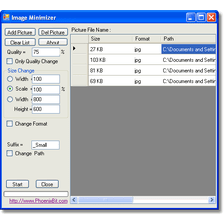
Fotosizer options

Fotosizer Options

Reviews for Fotosizer in other languages

Softonic Rating:Very good
10/10

User Rating

4 ratings
Usability
  • Currently 10/10.
Stability
  • Currently 10/10.
Installation
  • Currently 10/10.
Functionality
  • Currently 9/10.
Appearance
  • Currently 9/10.

Download stats

Related

Related searches
View all

Are you the developer of Fotosizer?

If your program has received a Softonic rating, feel free to use the following award badge on your site or as part of any other promotional feature you may be putting together.

Fotosizer Softonic Rating

Click on the above text field to copy the necessary HTML to your clipboard and then paste it to your website. It will display your program's Softonic Rating and will link to your program page.

Any queries? Contact us if you want more info.

Close